top of page

Create a list items using an array in Power Automate

Morning all,


I came across this post on the Power Automate forums:


"Title: Create a list items using an array in Power Automate


Hello Power Users,


I have a sample array in the below format and would like to loop. through it to create list items inside a SharePoint list.


Array :  ["AAA, BBB, CCC",

              "DDD,EEE,FFF",

               "GGG,HHH,III"]

Can anyone please help!


Thank you so much in advance!"


Ok, lets take a look.


First of all, create a new flow, call it whatever you want, I have gone with the post title. I have created, and instant flow, as I think that is easiest here.


The next step is to create an Array variable:


Step 1 Initialize ArrayVariable

Your flow will look like this:


Flow progress so far


Next initialize another variable, call it Index, type = Integer and a value of 0, like below:

Step 2 Initialize Index variable

Next add an Apply to each, for the Select an Output from Previous Steps, select the ArrayVariable:


Step 3 - Apply to each

Inside the Apply to Each step, add an Increment variable, and choose Index, and increment it by 1:


Step 4 - Increment Index variable

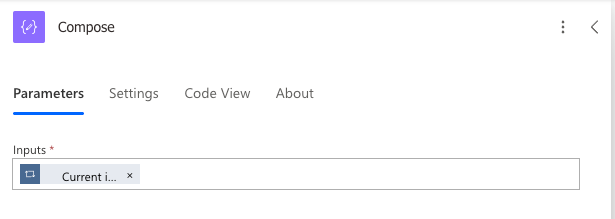
Next add a compose:


Step 5 - Compose current item

The inputs will be the Current item, you ca write this as an expression if you want as item()


Finally, add your outputs of the compse (within the apply to each) to your SharePoint site:


Step 6 - Create item in SharePoint

This will then create the items in the SharePoint list you have selected:


Result in SharePoint

The beauty of this method is that you can have as many items in your array at the start for example:


I have added more lines to the ther ArrayVariable:


Adding additional lines to the Array

And hey presto, all of the items have been added:


Result in SharePoint after more array items have been added

Here is the full flow end to end:


Power Automate cloud flow structure end to end, all steps

14 Comments


Interesting article with useful explanations and an enjoyable reading experience from beginning to end. I appreciate blogs that genuinely focus on helping readers understand topics instead of simply filling articles with unnecessary technical details everywhere online. Your writing style made the complete discussion much more engaging and easier to follow overall. During my recent online search for similar resources, I also checked allpanelexch9 and found helpful information there too. Keep posting more quality and informative blog content regularly.

Like

Me gusta cómo el artículo plantea ideas prácticas sin complicarlas demasiado, algo que siempre se agradece. Además, me recordó a sportium por esa combinación de dinamismo y experiencia de usuario bien cuidada. Da gusto encontrar contenidos que realmente invitan a seguir leyendo.

Like

Mình có lần lướt đọc mấy trao đổi trên mạng شيخ روحاني thì thấy nhắc nên cũng tò mò mở ra xem thử cho biết. Mình không tìm hiểu sâu rauhane chỉ xem qua trong thời gian ngắn để quan sát bố cục s3udy cách sắp xếp các mục và trình bày nội dung tổng thể. Cảm giác là các phần được trình bày khá gọn, các mục rõ ràng nên đọc lướt cũng không bị rối Berlinintim, với mình như vậy là đủ để nắm   tin cơ bản rồi. q8yat

Like

Mình có lần lướt đọc mấy trao đổi trên mạng شيخ روحاني thì thấy nhắc nên cũng tò mò mở ra xem thử cho biết. Mình không tìm hiểu sâu rauhane chỉ xem qua trong thời gian ngắn để quan sát bố cục s3udy cách sắp xếp các mục và trình bày nội dung tổng thể. Cảm giác là các phần được trình bày khá gọn, các mục rõ ràng nên đọc lướt cũng không bị rối Berlinintim, với mình như vậy là đủ để nắm   tin cơ bản rồi. q8yat

Like

Really enjoyed this walkthrough—I've struggled before with looping through arrays in Power Automate and ending up with messy or inefficient flows, so seeing it broken down this clearly made it click. What stood out to me was how practical the approach is, especially when dealing with dynamic data rather than static inputs. It actually reminded me of using Schon's reflective model, where you learn by doing and then refining your approach based on what works and what doesn’t—in this case, testing flows, spotting inefficiencies, and improving structure. I’ve often overcomplicated things with nested loops, so this feels like a cleaner, more maintainable solution. It also makes me think about how small design choices in automation can have a big impact…

Like

Subscribe Form

©2019 by Jon Does Flow. Proudly created with Wix.com

bottom of page